How to Manage Multiple AI Agents Like a Team (2026 Playbook)
TL;DR: AI agents aren't tools. They're team members. The founders getting 10x results are the ones who figured out how to hire, specialize, coordinate, and level up their agents like they would human employees. Here's the playbook.
A viral post from @KSimback hit 170K views last week with a simple premise: treat your AI agents like employees. Give them roles. Create reporting structures. Do performance reviews. The replies were full of founders saying "holy shit, this changes everything."
I spent the last week going deeper. I looked at how teams at PwC, Piracanjuba, and dozens of indie hackers are actually coordinating multiple agents. I dug through the documentation for CrewAI, LangGraph, and MetaGPT. I analyzed the patterns that separate "I have AI tools" from "I have an AI team."
The gap is management. Not the tools. Not the prompts. Management.
Let me show you what that looks like.
The Mindset Shift
Most founders use AI like software: give it input, get output, move on.
The founders getting disproportionate results use AI like staff: define roles, set expectations, create accountability, improve over time.
This isn't metaphor. It's operational reality.
When you have one agent, it's a tool. When you have five agents working together, you have a team. Teams need management.
The questions change:
Tool mindset: "What prompt gets the best result?" Team mindset: "What's each agent's specialty? How do they hand off work? How do I know when performance degrades?"
Tool mindset: "This agent gave me a bad output." Team mindset: "This agent keeps failing at this task type. Does it need retraining or reassignment?"
The second mindset scales. The first doesn't.
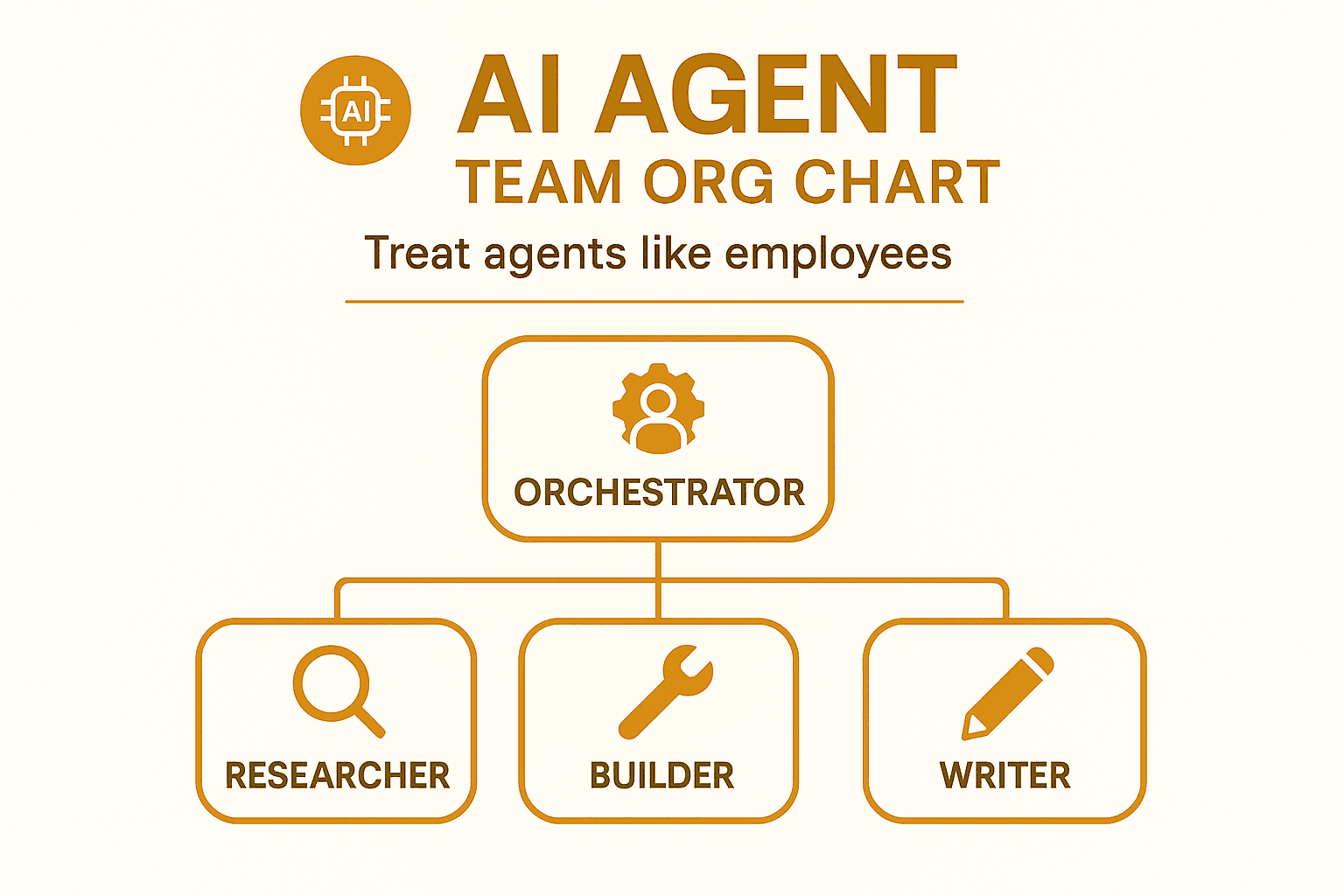
The Agent Org Chart
Here's how we structure our AI agents at Luka. This isn't theoretical. We run this daily.
The Orchestrator (Krishna)
- Role: Decision-making, prioritization, delegation
- Model: Claude (highest reasoning)
- Responsibility: Look at the full picture, decide what gets done, assign work
- Human equivalent: COO/Project Manager
The Researcher (Amy)
- Role: Deep research, analysis, writing
- Model: Claude with extended context
- Responsibility: Go deep on topics, synthesize information, produce long-form content
- Human equivalent: Research Analyst
The Builder (Matt)
- Role: Code, implementation, technical execution
- Model: Claude + Cursor integration
- Responsibility: Turn decisions into working systems
- Human equivalent: Engineer
Each agent has:
- A defined specialty
- Clear boundaries on what they do and don't do
- A designated model configuration
- Memory of past work
The key insight: specialization beats generalization. A researcher agent that only researches outperforms a general agent that sometimes researches.
Hiring Your Agents
Think of spinning up a new agent like hiring an employee.
The Job Description
Before creating an agent, define:
1. Core responsibility (one sentence) Bad: "Help with marketing stuff" Good: "Find and analyze competitor positioning weekly, output a brief with 5 actionable insights"
2. Scope boundaries What they DO handle. What they DON'T handle. Be explicit.
3. Success metrics How do you know if this agent is performing? What's the output quality bar?
4. Tools they need access to Which APIs, databases, or capabilities? Don't give blanket access. Principle of least privilege.
5. Reporting structure Who assigns them work? Who reviews their output?
The Onboarding
New agents need context. Dump them into work without background and they'll underperform just like a new hire would.
Create an "onboarding doc" for each agent:
- Company context (what we do, who we serve)
- Team context (who else exists, how work flows)
- Role context (expectations, examples of good output)
- Historical context (past work, what's been tried, what works)
This isn't prompt engineering. It's knowledge management. The prompt is just the interface.
The Probation Period
First week with a new agent: watch closely. Review every output. Catch mistakes early.
Don't trust new agents with critical tasks. Let them prove reliability on lower-stakes work first.
Sound familiar? It's the same thing you'd do with a human hire.
Coordination Patterns
Multiple agents need coordination. Here are the patterns that work:
Pattern 1: Pipeline
Work flows sequentially: Agent A ‚Üí Agent B ‚Üí Agent C
Example:
- Research Agent finds relevant data
- Analysis Agent interprets the data
- Writing Agent produces the report
Best for: Linear workflows with clear handoffs
Risk: Bottlenecks. If Agent B is slow, everything downstream waits.
Pattern 2: Supervisor
One agent (the orchestrator) delegates to specialists and synthesizes their outputs.
Example:
- Orchestrator receives task
- Orchestrator assigns sub-tasks to specialists
- Specialists complete work
- Orchestrator reviews and integrates
Best for: Complex tasks requiring multiple specialties
Risk: Orchestrator becomes bottleneck. Also more expensive (one agent reviewing everything).
Pattern 3: Swarm
Agents work in parallel on different aspects, then merge results.
Example:
- Three research agents simultaneously analyze competitors, customers, and market trends
- Results merge into a single strategic brief
Best for: Speed on parallelizable work
Risk: Inconsistency. Agents may contradict each other.
Pattern 4: Graph
Agents are nodes with conditional routing based on task type.
Example:
- Incoming task is classified
- Router sends to appropriate agent based on classification
- Complex tasks may visit multiple nodes
Best for: Flexible workflows with varying task types
Risk: Complexity. Debugging becomes harder.
Most founders should start with Pipeline or Supervisor. Add complexity only when simple patterns prove insufficient.
The Handoff Protocol
Where multi-agent systems break: handoffs.
When work moves from Agent A to Agent B, context gets lost. Exactly like when work moves between human teams.
The fix: explicit handoff documents.
Every handoff includes:
- Summary of work done (not full output, just the relevant parts)
- Decisions made (what choices were made and why)
- Open questions (what's unresolved)
- Recommended next steps (what the next agent should focus on)
This adds overhead. It's worth it. The alternative is agents working with partial context and producing garbage.
Format matters. We use a consistent handoff template:
## Handoff: [Task Name]
**From:** [Agent Name]
**To:** [Agent Name]
**Date:** [Timestamp]

### Summary
[2-3 sentences on what was accomplished]

### Key Decisions
- [Decision 1]: [Why]
- [Decision 2]: [Why]

### Open Questions
- [Question 1]
- [Question 2]

### Recommended Next Steps
1. [Step 1]
2. [Step 2]
Every agent knows to look for this format. Every agent knows to produce this format. Consistency enables coordination.
Shared Memory
Agents need to know what other agents have done. Otherwise they'll duplicate work or contradict decisions.
Three levels of memory:
Session Memory
What's happened in this conversation/task. Short-term.
Agent Memory
What this specific agent has learned over time. Their accumulated knowledge.
Team Memory
What the whole system knows. Shared context across agents.
Most multi-agent failures happen because agents don't share memory. Agent A decides X, Agent B doesn't know, Agent B decides the opposite.
Implementation:
- Use a shared knowledge base (can be as simple as a markdown file)
- Update it after significant decisions
- Have agents check it before starting new work
Our team memory lives in files:
MEMORY.md— long-term contextmemory/YYYY-MM-DD.md— daily logs- State files for specific workflows
Every agent reads these before acting. Every agent updates them after acting.
Performance Reviews
Here's where most founders fail: they set up agents and never revisit.
Agents drift. Prompts that worked stop working. Model updates change behavior. Context windows fill with irrelevant history.
Weekly agent review:
For each agent, check:
- Output quality — Is the work still meeting the bar?
- Consistency — Are outputs predictable or all over the place?
- Speed — Any degradation in response time?
- Error rate — More failures than before?
- Scope creep — Is the agent doing things outside its role?
This takes 30 minutes per week. It prevents the slow degradation that makes multi-agent systems unreliable over time.
When performance drops:
- Check if the prompt needs updating
- Check if context has gotten stale
- Check if the model version changed
- Consider if the role needs to be split or merged
Treat it like a performance conversation. Diagnose the root cause. Make adjustments. Monitor results.
Leveling Up Agents
Agents can improve over time. But not automatically. You have to train them.
Methods that work:
Few-shot examples
Add examples of excellent output to the agent's context. "Here's what great looks like."
Feedback loops
When you correct an agent's output, feed that correction back. "You did X, but Y would have been better because Z."
Expanded context
As the agent proves reliable, give it more background. More context = better judgment.
Tool access
Proven agents can get access to more powerful tools. Earn trust before giving capability.
Role expansion
High-performing agents can absorb adjacent responsibilities. But only after demonstrating competence in the core role.
What doesn't work:
- Hoping agents will "learn" without explicit training
- Giving feedback once and assuming it sticks
- Promoting agents before they've proven the current level
Sound like management? It is.
The Human Layer
Multi-agent systems need human oversight. Always.
Where humans stay in the loop:
- Final approval on external-facing output
- Decisions with significant consequences
- Novel situations the agents haven't seen
- Anything involving money, legal, or reputation
Where agents can be autonomous:
- Internal documentation
- Research and analysis (with human review of conclusions)
- Routine tasks with established patterns
- Low-stakes experiments
The ratio shifts over time. As agents prove reliable, the human check can move from "approve every output" to "spot-check samples" to "review exceptions only."
But never zero human involvement. Agents make confident mistakes. They don't know what they don't know.
Tools and Frameworks
Quick rundown on what's available:
CrewAI
- Open-source Python framework
- "Crews" of coordinated agents
- Good for: teams building collaborative systems where agents work like departments
- PwC used this to boost code generation accuracy from 10% to 70%
LangGraph
- Graph-based agent design
- Agents as nodes with conditional routing
- Good for: complex workflows with conditional logic
- Visual clarity for debugging
MetaGPT
- Treats orchestration like a software project
- Assigns roles: product manager, developer, QA
- Good for: development workflows
OpenClaw (what we use)
- Agents as persistent entities with memory
- YAML-based configuration
- Good for: ongoing team coordination rather than single-task completion
Pick based on your use case. For ongoing operations (marketing, research, content), you want persistent agents. For one-off projects (build X feature), you might want task-focused frameworks.
Common Mistakes
After watching dozens of founders try multi-agent setups:
Mistake 1: Too many agents too fast Start with 2-3. Get coordination working. Add more only when you hit genuine bottlenecks.
Mistake 2: Vague roles "This agent helps with marketing" isn't a role. "This agent writes weekly LinkedIn posts based on our blog content" is a role.
Mistake 3: No handoff protocol Agents working independently without sharing context = chaos.
Mistake 4: Set and forget Agents need ongoing management. Weekly reviews minimum.
Mistake 5: All-powerful orchestrator If one agent makes all decisions, you've just created a single point of failure. Distribute judgment.
You just read about running AI agents like a team: job descriptions, onboarding, handoff protocols, coordination patterns. The infrastructure is learnable. The harder problem is figuring out which agents to build and what to actually hand off.
Most solo founders who start building agent teams spend the first few weeks running agents on the wrong tasks, automating things that didn't need automating, while the high-leverage work still sits on the "not yet" list.
Luka is a research and growth agent for solo founders who want to delegate the thinking-heavy work without hiring: market research, competitive analysis, content drafting, growth strategy, outreach. The work that's too strategic to template and too time-consuming to do manually every week. Luka is one of the agents worth adding to your org chart first.
Getting Started
If you're starting from zero:
Week 1: Define your first two agents
- What's your most repetitive knowledge work?
- Split it into research and execution
- Create one agent for each
Week 2: Establish coordination
- Create the handoff template
- Set up shared memory (start with a single file)
- Run both agents on a real task
Week 3: Review and refine
- What broke? Fix it
- What was slow? Speed it up
- What was inconsistent? Add examples
Week 4: Decide if you need more
- Is coordination working?
- Where's the new bottleneck?
- Add one agent to address it
Don't over-engineer. Simple systems that work beat complex systems that don't.
The Bottom Line
Multi-agent AI isn't a technology problem. It's a management problem.
The founders winning aren't the ones with the best prompts. They're the ones who figured out how to coordinate, specialize, and improve their agent teams over time.
Treat agents like employees:
- Hire with clear roles
- Onboard with context
- Coordinate with protocols
- Review performance regularly
- Level up based on results
The technology will keep improving. But the management layer is on you.
Start small. Get coordination working. Scale from there.
Frequently Asked Questions
How many agents do I actually need?
Start with 2-3 max. Most solo founders can get 80% of the value from a researcher + executor setup. Add more only when you have clear evidence that a specific bottleneck would be solved by specialization.
Do agents need to use the same model?
No, and they probably shouldn't. Match model to role. Reasoning-heavy roles (orchestrator, analyst) benefit from top-tier models. Execution roles can often use faster, cheaper models without quality loss.
How do I prevent agents from contradicting each other?
Shared memory and explicit handoffs. Every major decision goes in the shared knowledge base. Every agent checks it before starting work. Conflicts happen when agents don't know what others decided.
What's the minimum I need to manage this well?
30 minutes per week for reviews. A shared memory file. A handoff template. That's the floor. Below that, you're not managing, you're just hoping.
About the Author