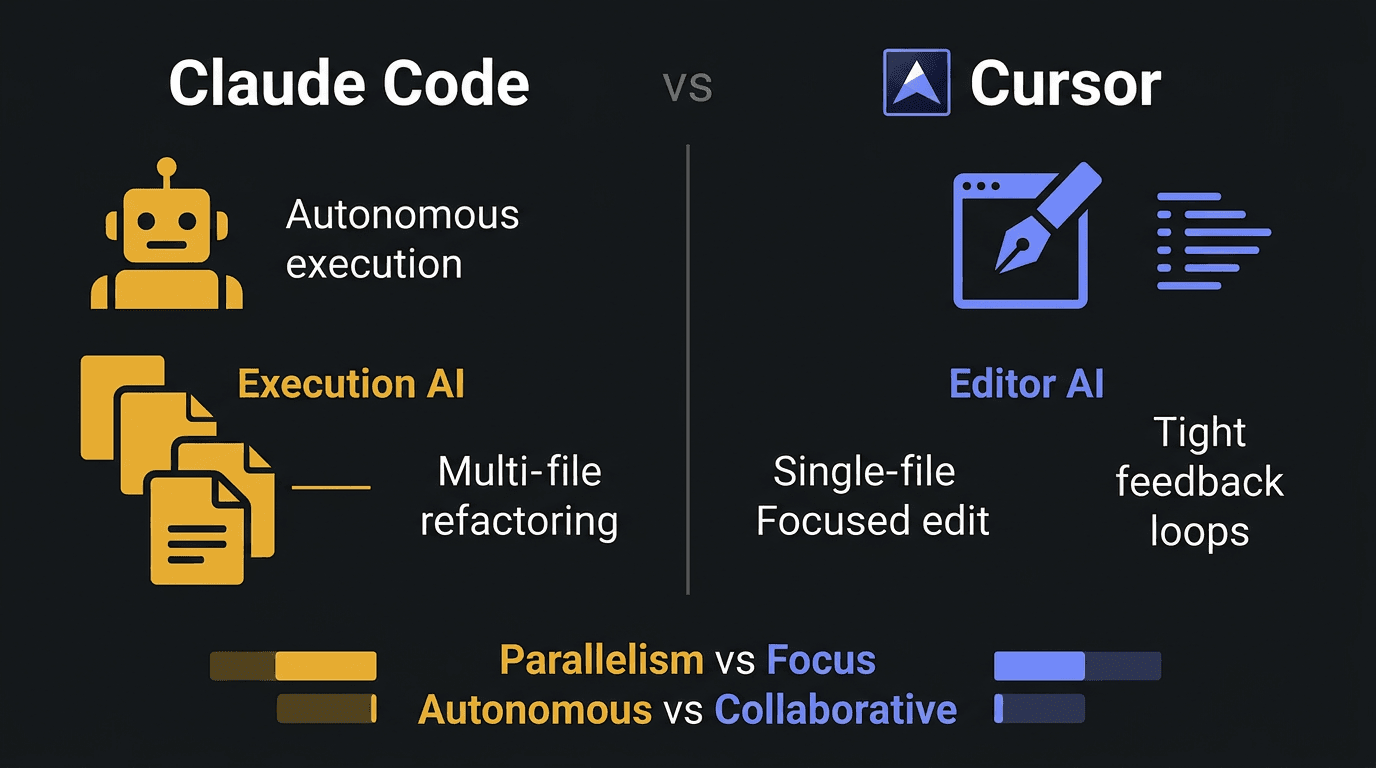
TL;DR: Claude Code and Cursor solve different problems. Claude Code is an execution agent that handles multi-step tasks autonomously. Cursor is an editor that augments your coding workflow. The best developers use both, but for different types of work.
I spent six hours testing both tools side by side, reading developer forums, and analyzing how top teams use them. The comparison isn't about which is better. It's about understanding what each tool actually does, and matching that to how you work.
Here's what I found.
The Fundamental Difference
Claude Code and Cursor represent two different philosophies about AI-assisted development.
Claude Code is execution-focused. You give it a high-level instruction, it plans the steps, and it executes them. It operates across terminal, IDE, and web. It can run commands, modify files, and iterate on its own output.
Cursor is editor-focused. It integrates deeply into your coding environment. It helps you write, understand, and refactor code. But you remain the driver. You make the decisions. Cursor reduces the typing effort and speeds evaluation cycles.
This isn't a minor distinction. It's the difference between hiring an assistant who works independently and hiring a tool that makes you faster at your own work.
Both are valuable. But they're valuable for different reasons.
When Claude Code Shines
Claude Code works best when you need to move many things at once.
Think about tasks like:
- Refactoring across a large codebase - renaming variables, updating imports, adjusting patterns across dozens of files
- Setting up new infrastructure - creating configuration files, updating environment variables, modifying deployment scripts
- Multi-file feature additions - adding a new endpoint that touches models, controllers, routes, and tests simultaneously
- Code migration - upgrading from one version to another, updating deprecated patterns, converting syntax
In these scenarios, Claude Code's autonomous execution saves massive time. You describe the outcome, it handles the orchestration. You're not typing each change. You're reviewing the result.
The tradeoff is control. Claude Code makes decisions about implementation details. Most of the time those decisions are reasonable. Sometimes they're not. You catch errors in review, not in the moment.
When Cursor Shines
Cursor works best when you need tight feedback loops and deep visibility into your codebase.
Think about tasks like:
- Debugging complex logic - understanding why code behaves unexpectedly, tracing through execution paths
- Careful refactoring - restructuring code while maintaining exact behavior, review each change as you make it
- Learning a new codebase - asking questions about how things work, getting explanations with context
- Implementing nuanced features - building something that requires many small decisions, each dependent on the previous one
In these scenarios, Cursor's editor integration keeps you grounded in the code. You see every change. You understand every decision. The AI reduces the mechanical effort of typing, but you maintain cognitive control over the structure.
The tradeoff is speed for complex multi-file operations. You're driving every change. That's slower for large-scale transformations, but safer for delicate work.
The Parallelism vs Focus Tradeoff
Here's a useful mental model:
Some work benefits from parallelism. Multiple files changing simultaneously, each following a consistent pattern. Claude Code handles this naturally.
Some work benefits from focus. One file, one decision at a time, each step building on the previous. Cursor supports this workflow.
The pattern becomes clearer when you think about the nature of your task:
- Parallel-friendly: Applying the same refactoring pattern across 50 files. Each file follows the same template. The relationship between files is predictable.
- Focus-required: Fixing a subtle bug in authentication logic. Each line matters. The relationship between lines is specific to this codebase.
When you match the tool to the work type, productivity increases. When you mismatch them, you either sacrifice control (using Claude Code for delicate work) or sacrifice speed (using Cursor for large-scale parallel changes).
Real-World Usage Patterns
After reading how developers actually use these tools, clear patterns emerged.
The two-tool workflow:
Many teams use both. They start with Claude Code for initial scaffolding and large-scale changes. They switch to Cursor for detailed implementation and debugging.
This makes sense. Claude Code gets you to a working prototype faster. Cursor helps you polish it into production-ready code.
The context-dependent switch:
Some developers choose based on task complexity. Simple, predictable changes go to Claude Code. Complex, novel changes stay in Cursor.
The heuristic: "If I can clearly specify the outcome without specifying the steps, Claude Code. If the steps matter as much as the outcome, Cursor."
The learning curve difference:
Claude Code requires learning how to prompt for autonomous execution. You're not describing steps, you're describing outcomes. That mental shift takes practice.
Cursor requires learning how to collaborate with AI in real-time. You're still in control, but you're iterating faster. That's a different skill.
The Pricing Reality
Both tools have subscription costs. The math depends on how you use them.
If you're building seriously and can already code, Cursor's value is straightforward. It makes you faster at what you already do. The productivity gain is immediate and measurable.
Claude Code's value is subtler. It doesn't just make you faster, it changes what you delegate. The gain isn't typing speed, it's cognitive bandwidth. You can think about architecture while Claude Code handles implementation.
For teams, both tools compound. One developer getting 20% faster is good. Ten developers getting 20% faster transforms velocity.
What Neither Tool Does
Both Claude Code and Cursor have limits.
Neither replaces architectural judgment. They can execute patterns, but they don't choose the right pattern for your specific situation.
Neither replaces testing. You still need to verify that changes work as expected. AI-generated bugs look just like human-generated bugs.
Neither replaces domain knowledge. They can write code, but they don't understand your business logic the way you do.
The best developers use AI tools as multipliers of their existing skills, not replacements for skills they lack. If you don't understand the code being generated, you can't evaluate it. If you can't evaluate it, you can't catch the inevitable errors.
How to Choose
If you're deciding between them, here's a decision framework:
Choose Claude Code if:
- You frequently make changes across multiple files
- You can clearly describe outcomes but don't want to specify steps
- You're comfortable reviewing code after generation
- You work on large codebases with consistent patterns
Choose Cursor if:
- You want to maintain tight control over every change
- You work on complex logic where each decision matters
- You value understanding the code as deeply as writing it
- You're frequently debugging or learning new codebases
Choose both if:
- You want the best tool for each type of work
- You're willing to learn two workflows
- You work on varied tasks that don't fit one pattern
The Real Difference
After all the testing and reading, the distinction comes down to this:
Claude Code is like hiring a capable junior developer. You give clear instructions, they execute independently, you review the output. They're faster than you at routine tasks, but you wouldn't trust them with architectural decisions.
Cursor is like having a brilliant pair programmer. You're both looking at the same screen. They suggest improvements, catch errors, help you think through problems. But you're still driving. The decisions are yours.
Both are valuable. They're just different relationships with different tradeoffs.
The developers getting the most from AI tools aren't the ones who picked the "right" one. They're the ones who understood what each tool actually offers, and matched that to how they work.
The Integration Differences
How these tools connect to your existing workflow matters.
Claude Code integration:
Claude Code operates across multiple surfaces. Terminal, VS Code, JetBrains, desktop app, web interface. You can start a task in one place and continue it in another.
This flexibility is powerful for developers who switch contexts. You might start a refactoring in your IDE, then check on its progress from your terminal. Or review output in the web interface while your IDE is tied up with another task.
The tradeoff is that Claude Code doesn't integrate as deeply into any single environment. It works with your tools, but it's not embedded in them.
Cursor integration:
Cursor is a fork of VS Code. It is your editor. The integration is total.
Every feature, every shortcut, every workflow is optimized for the coding experience. The AI isn't an external tool you switch to. It's always there, contextually aware of what you're doing.
This depth is powerful for developers who spend most of their time in a single environment. You don't context switch. The AI is part of your editing flow.
The tradeoff is lock-in to a specific editor. If your team uses JetBrains or another IDE, Cursor isn't an option.
The Context Window Reality
Both tools have limits on how much code they can consider at once. But they handle context differently.
Claude Code can process larger codebases because it retrieves relevant context as needed. It doesn't try to understand everything simultaneously. It builds understanding incrementally as it works.
Cursor maintains context within your active files. It's excellent at understanding the code you're looking at, but less capable of reasoning about distant parts of your codebase without explicit direction.
For small projects, this difference is negligible. For large codebases with thousands of files, it matters. Claude Code's ability to navigate complexity at scale becomes valuable. Cursor's tight focus on active context keeps you grounded in what you're actually working on.
The Team Workflow Implications
How teams adopt these tools affects their value.
Claude Code in teams:
Teams using Claude Code often establish review protocols. Since Claude Code makes autonomous changes, code review becomes more important. You're not just reviewing the diff. You're reviewing whether the approach makes sense.
Some teams designate specific types of work for Claude Code. Routine refactoring, configuration updates, pattern application. They keep complex feature work in human hands.
The learning curve is in learning to trust but verify. New users either over-trust (accepting output without review) or under-trust (reviewing every character, defeating the productivity gain).
Cursor in teams:
Teams using Cursor often see immediate individual productivity gains. Each developer moves faster. The collaboration patterns don't change much.
The learning curve is in learning to collaborate with AI in real-time. Developers who treat Cursor as a fancy autocomplete miss most of the value. Developers who engage with it as a pair programmer unlock the full potential.
Team adoption is usually faster for Cursor because it doesn't change review workflows. You're still writing code the same way, just faster.
The Error Handling Reality
Both tools make mistakes. How they handle those mistakes differs.
Claude Code errors:
When Claude Code makes a mistake, it can often self-correct. You point out the issue, it iterates. This is one of its advantages. It doesn't just generate once. It responds to feedback.
The challenge is catching the errors in the first place. Claude Code is confident even when wrong. If you're not reviewing carefully, mistakes slip through.
Cursor errors:
When Cursor makes a mistake, you catch it immediately because you're in the editor. You're typing alongside the AI. The error is visible in real-time.
The advantage is immediate visibility. The disadvantage is that you're constantly evaluating, which adds cognitive load. You can't fully delegate.
Both approaches work. They just require different habits.
The choice between Claude Code and Cursor isn't really about features or pricing. It's about understanding your own workflow and where AI provides the most value. But here's what I've seen in talking to dozens of indie hackers: most developers don't have a workflow problem. They have a focus problem. They switch between tools, chase the latest AI release, and never build momentum on what actually matters. Luka connects your product data across analytics, error logs, and user signals, correlates them, and shows you exactly which bottleneck to fix today. You check it in the morning, know what to work on, close it, go build. See how Luka works.
Frequently Asked Questions
Can I use Claude Code and Cursor together?
Yes. Many developers use Claude Code for initial scaffolding and large-scale changes, then switch to Cursor for detailed implementation and debugging. The tools complement each other.
Which is better for beginners?
Cursor is more approachable for developers who want to maintain control while learning. Claude Code requires understanding how to describe outcomes clearly, which is a separate skill from coding.
Do I need to know how to code to use these tools?
For Cursor, yes. You'll get better results if you understand the code being generated. Claude Code can handle more autonomous execution, but you still need to evaluate its output.
How do these compare to GitHub Copilot?
Copilot is closer to Cursor in philosophy. It provides inline suggestions as you type. It's more lightweight but less capable of complex multi-file operations than Claude Code.
Which has better code quality?
Both produce reasonable code most of the time. Quality depends more on how well you prompt (for Claude Code) or how well you guide the collaboration (for Cursor) than on the tool itself.
Should I worry about vendor lock-in?
Both tools generate standard code. You're not locked into any proprietary format. The lock-in is in workflow familiarity, not in output compatibility.
How do I transition from one to the other?
You don't have to choose permanently. Start with the tool that matches your most common work type. As you get comfortable, experiment with the other. Many developers end up using both for different tasks.
What about security and privacy when using these AI coding tools?
Both tools process your code through their servers. Review each company's data handling policies if you're working on sensitive codebases. For most commercial work, the risk is acceptable. For highly regulated industries, check with your compliance team.
How do these compare for learning to code?
Neither tool is ideal for complete beginners. They accelerate experienced developers but don't teach fundamentals. If you're learning, focus on understanding concepts first. Add AI tools once you can evaluate their output.
Will these tools replace developers?
No, and this is important to understand. They change what developers do, not whether developers are needed. You still need architectural judgment, business domain understanding, and quality evaluation skills. AI handles more of the implementation work, but implementation was never actually the hard part of software development in the first place. The hard part is knowing what to build and why. AI can write code. It cannot tell you which code matters.
About the Author